Make AI footage look shot on film.
60 LUTs, 4K grain, light leaks and prompt suffixes built for Kling, Veo, Seedance and Sora clips. One pack. Every editor. Pay once.
 Before · AI clipAfter · Blockbuster
- 60
- film looks
- 20
- 4K overlays
- 5
- editors + FFmpeg
- $19
- once, no subscription
Normal LUTs break AI clips.
Already graded
AI models export contrasty Rec.709. Camera LUTs expect flat log, so they grade it twice — crushed shadows, clipped skies.
Plastic skin
Generated faces drift orange or pink and look waxy. Every look protects the skin line and softens the highlight shoulder.
Too clean
No grain, no halation, no gate weave. Pro adds 4K film grain, dust, light leaks and halation that sell it as shot.
Sixty looks. Seven families.

 BeforeFree
Daylight 250D
Film stocksA modern daylight negative printed soft — the honest film look.

 BeforeFree
Blockbuster
Teal & orangeThe summer-tentpole split, kept honest on skin.
 Before
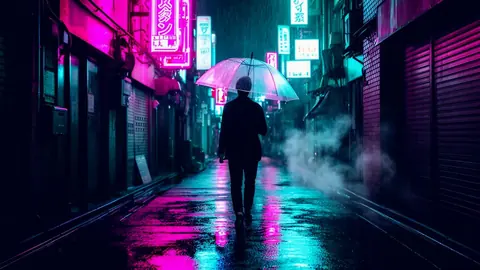
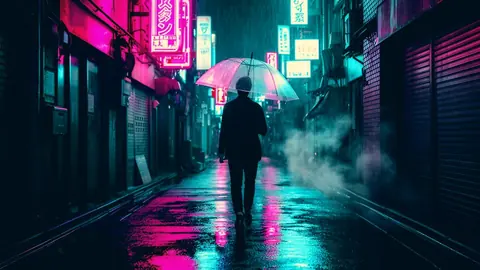
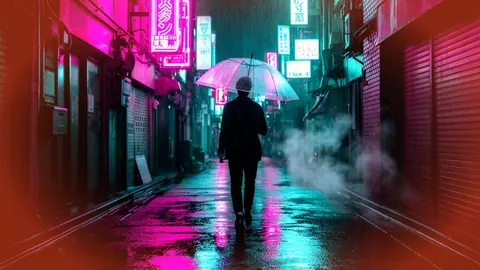
Neon Noir
NightGlossy black wet streets, neon kept rich, skin kept human.
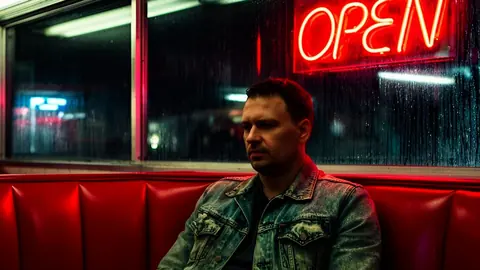
 BeforeFree
Sunday 64
VintageOld reversal postcard: saturated reds, mustard yellows, contrasty blues.

 Before
Nordic
MoodyScandinavian drama: cold, clean, desaturated and lifted.

 Before
Meadow Cel
Anime & stylisedHand-painted summer meadow: soft cyan skies and lush yellow-greens.
 Before
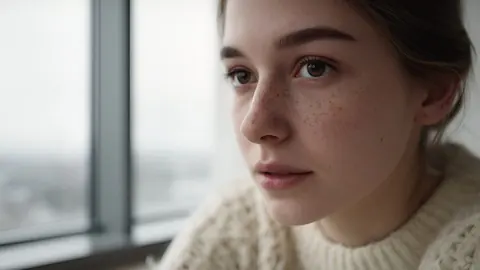
Portrait 400
Film stocksGentle portrait negative — peach skin, pastel greens, soft contrast.
 BeforeFree
Sodium Street
NightOrange streetlight against deep cyan night.
Grain, leaks and halation in 4K.
Procedurally rendered at 3840×2160, 24 fps. Dust and scratches ship as ProRes 4444 with real alpha.
 BeforePro · 4K
35mm Classic Grain
GrainMid-speed 35mm negative grain — the default for AI footage.
 BeforePro · 4K
Amber Leak
Light leaksWarm amber spill from the right edge, slow and soft.
 BeforePro · 4K
Halation Bloom
Halation & flickerBreathing red-orange edge bloom that mimics halation on bright frames.
 BeforePro · 4K
VHS Tracking
VHSTracking bands, head-switch noise and snow along the bottom.
Start the look in the prompt.
Each look ships with a suffix for your video model. Append it to any Kling, Veo, Seedance or Sora prompt and the generation leans toward the grade — film stock, grain, halation, light — so the LUT finishes the job instead of fighting it.
A woman cycles along a canal at dawn, medium tracking shot
a modern daylight negative printed soft, the honest film look, shot on 35mm motion picture film, Cooke anamorphic lenses, soft highlight roll-off, natural film grain, gentle halation around highlights, organic colour, slight gate weave
Drop-in for every editor.
Exactly what you download.
Pay once. Keep it forever.
Lutpack Core
LUTs- 60 looks in 7 families
- Rec.709 + Soft 60% versions
- LogC3, S-Log3 and Apple Log versions
- Prompt suffixes for every look
- Guides for 5 editors
- Free updates
Instant download · 7-day refund before first download
Lutpack Pro
LUTs + overlays- Everything in Core
- 20 4K overlays: grain, dust, light leaks, halation, VHS
- ProRes 4444 alpha for dust & scratches
- FFmpeg one-pass finishing recipes
- Client & commercial use
Instant download · 7-day refund before first download
Questions
Why do AI clips need special LUTs?
Most LUTs are built for flat log footage from cinema cameras. Kling, Veo, Seedance and Sora export already-graded, contrasty Rec.709 — so a normal LUT is applied twice: shadows crush, skin turns orange and highlights clip. Every Lutpack look takes Rec.709 in and is tuned on AI footage, with skin protection and soft highlight roll-off.
Which editors does it work in?
Anything that reads .cube 3D LUTs: Premiere Pro, DaVinci Resolve, Final Cut Pro, CapCut desktop, After Effects, Photoshop, OBS and FFmpeg. Step-by-step guides for the first five are in the pack and on this site.
What's the difference between Core and Pro?
Core is the 60 looks (300 files including Soft and log versions) plus prompt suffixes. Pro adds the 20 4K overlays — film grain, dust and scratches (with ProRes alpha), light leaks, halation and VHS — and allows client and commercial work.
Is the preview real?
Yes. The slider on every page applies the actual .cube file you download, on the GPU, in your browser. The FFmpeg verification report for all 300 files ships in the pack.
Will it work on my phone or real camera footage?
Yes. Phone and mirrorless footage in standard Rec.709 uses the main folder. If you shoot ARRI LogC3, Sony S-Log3 or Apple Log, use the matching versions in the Log folder.
What are prompt suffixes?
Short text you append to your Kling, Veo, Seedance or Sora prompt so the generation already leans toward the look — grain, halation, film stock, light — and the LUT has less work to do. One per look, grouped by family.
Is it a subscription?
No. Pay once, download forever, and get every free update to v1 (new looks are added in the changelog).
Refunds?
If you haven't downloaded anything yet, email us within 7 days for a full refund. Once files are downloaded we can't take them back.